Manual · Character
The sheet
The parts you would not guess by clicking. One rule for every row, what a rest and a level-up will not do for you, and where each number comes from.
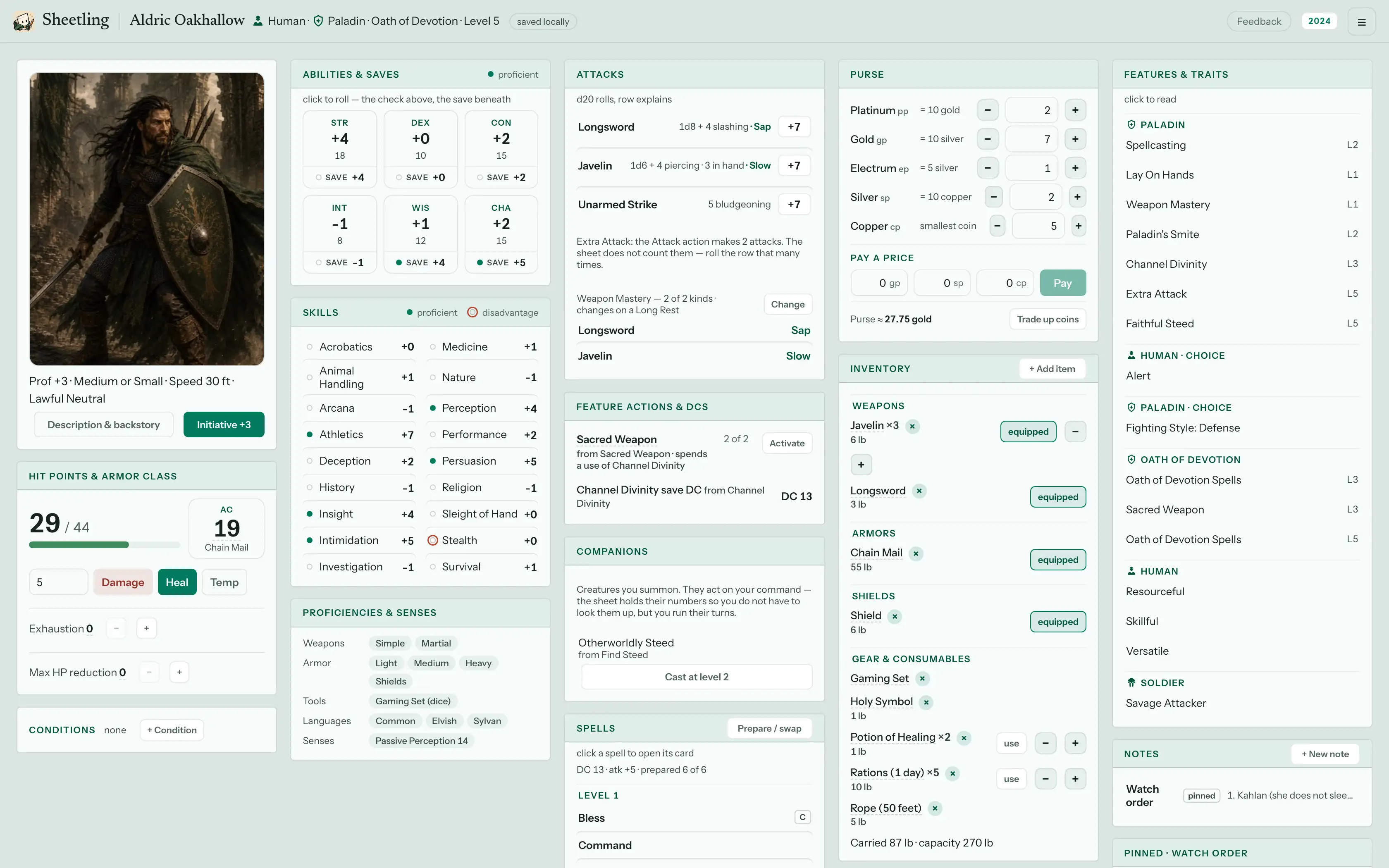
Opening rows and using controls
- The small control acts. The row opens details. A button, a die or a pip does the thing at once. The name beside it opens the rules text. A tracker's pips spend, its name reads. A condition chip's + adds, its name explains.
- A dashed underline means there is more. Tap Armor Class, a save DC or speed and a breakdown lists every candidate, the one in use and why the others lost: "would be 12 — you are wearing armor."
- The roll panel shows the modifier in parts before you roll. A held Advantage is applied and named; an elective one is a checkbox naming its source. Riders such as Sneak Attack or a Smite are chips on the result card: arm them, then Roll damage.
- Five sections in a fixed order: Combat, Abilities & Skills, Actions, Inventory & Purse, Features & Notes. Below tablet width they become tabs. Seated at a table, a phone gains a sixth, Party.
Hit points
- Type a number, then Damage, Heal or Temp. No confirmation.
dfocuses the field from anywhere. - Temp HP reads inline,
29 + 4 TEMP / 43, and never stacks: gaining some while holding some asks Keep or Take. The × beside it ends temp HP as its own logged action, not as damage. - At 0 HP the card becomes death saves. Stabilize is a button, not a roll. Damage at 0 is a failure (crit makes it two); overflow past your maximum is instant death.
- Conditions apply what they can. Poisoned's Disadvantage is real on the rolls it names. Exhaustion is a stepper on the HP card: Speed and the 2014 ladder are applied, the 2024 d20 penalty is shown as text and left to you.
- Concentration: damage opens the save with its DC worked out. Casting a second concentration spell swaps without asking; the Cast button warns first.
Rests and levels
- A rest previews, then you confirm. The dialog lists every change,
from → to. A rolled recharge (regain 1d6 + 4) rolls once, in the preview, and is never rerolled. Nothing to reset says Nothing to reset. - Hit dice spent inside the short-rest dialog stay spent even if you cancel. The button says so.
- A rest does not end a condition (exhaustion steps down one level) and does not touch Weapon Mastery picks, which change from their own Choose button.
- Level up is never automatic. Crossing an XP threshold offers the dialog. It asks, one level at a time, what your class's data grants: a subclass, feature picks, hit points (Average, Roll, or a Table roll you type in), a feat or an Ability Score Improvement, spells. The Ability Score Improvement is the one thing it will not let you skip.
- Choices in the menu answers an owed pick later, without levelling.
Spells and actions
- The Spells card header says which kind you are: known N of M, or prepared N of M · K free. Free casts from a feature sit on their own card, each
current of maxor at will; when a pick's uses run out, its button offers a slot instead. - A Ritual is its own button: no slot, no upcast, ten minutes logged.
- Upcasting happens on the spell's own card, with the dice preview updating per slot level. A cantrip's card carries Grows at level 5, 11, 17.
- Trackers state their reset rule on the row, and a reset is a list: a pool that returns on both rests says so.
- A resource exchange has no preview. Trading a slot for points, or back: the numbers are on the button, so pressing it is the trade.
- Toggles (Rage, a switchable Fighting Style) are Activate and End. An active one changes its numbers at once and shows a chip you can end it from anywhere.
- Extra Attack is a note, not enforced: roll the row that many times.
Gear
- equip on anything worn, attune on anything that asks for it. Only then does the item count. Over the attunement limit is a warning, never a block.
- A consumable's Use asks first, applies what the item declares (a heal, temp HP, a condition), and Undo brings it back. Nothing has a duration: a running effect stays until you dismiss it.
- Carried weight is shown, not enforced. Pay a price spends from the purse and makes change.
Features, notes, portrait
- A feature's name is the link to its text wherever it appears. A feature that is pure text offers Add a tracker for this.
- Notes are Markdown, save as you type, and the DM never sees them.
- The portrait is framed once (drag, zoom, and a band for the phone header) and used everywhere. It travels inside an export.
Settings and files
- One hue per character, twelve swatches or a slider, plus a Highlight chosen as a relation to it: Opposite, Triad or Neighbour. Light or dark belongs to the device, not the character.
- The status pill says what happened to your last edit: Saved, Saving…, Offline — N changes waiting, Changed elsewhere, Couldn't save. A signed-in character opens with no network and syncs when it returns.
- Export & print. Sheetling file is your backup and imports back exactly, portrait included, under a fresh id. Print / Save as PDF is the browser's own print dialog over a print stylesheet.
- House rules. Live rules change a number and label it (house rule) wherever that number's source is named. Table rules are notes. Save a set, export it as JSON, apply it to another character. Seated at a table, the table's set replaces yours until you leave.
- Library. A file is per account. Tick it per character under This character uses. Deleting a file leaves each pick as missing content on the sheet; with an account, re-importing the same file offers to restore it.
Keyboard
| Key | Does |
|---|---|
d | Focus the damage / heal field |
r, l | Short rest, long rest |
/ | Search the compendium |
? | This list |
Cmd/Ctrl+Z, Shift+Cmd/Ctrl+Z | Undo, redo |
←, → | Previous and next section tab |
All of them stay quiet while you are typing, while a dialog is open, and while a roll waits for Roll d20.