Manual · DM
Battle maps
Upload a map, set its scale and grid, place tokens and markers, and control what the party can see.
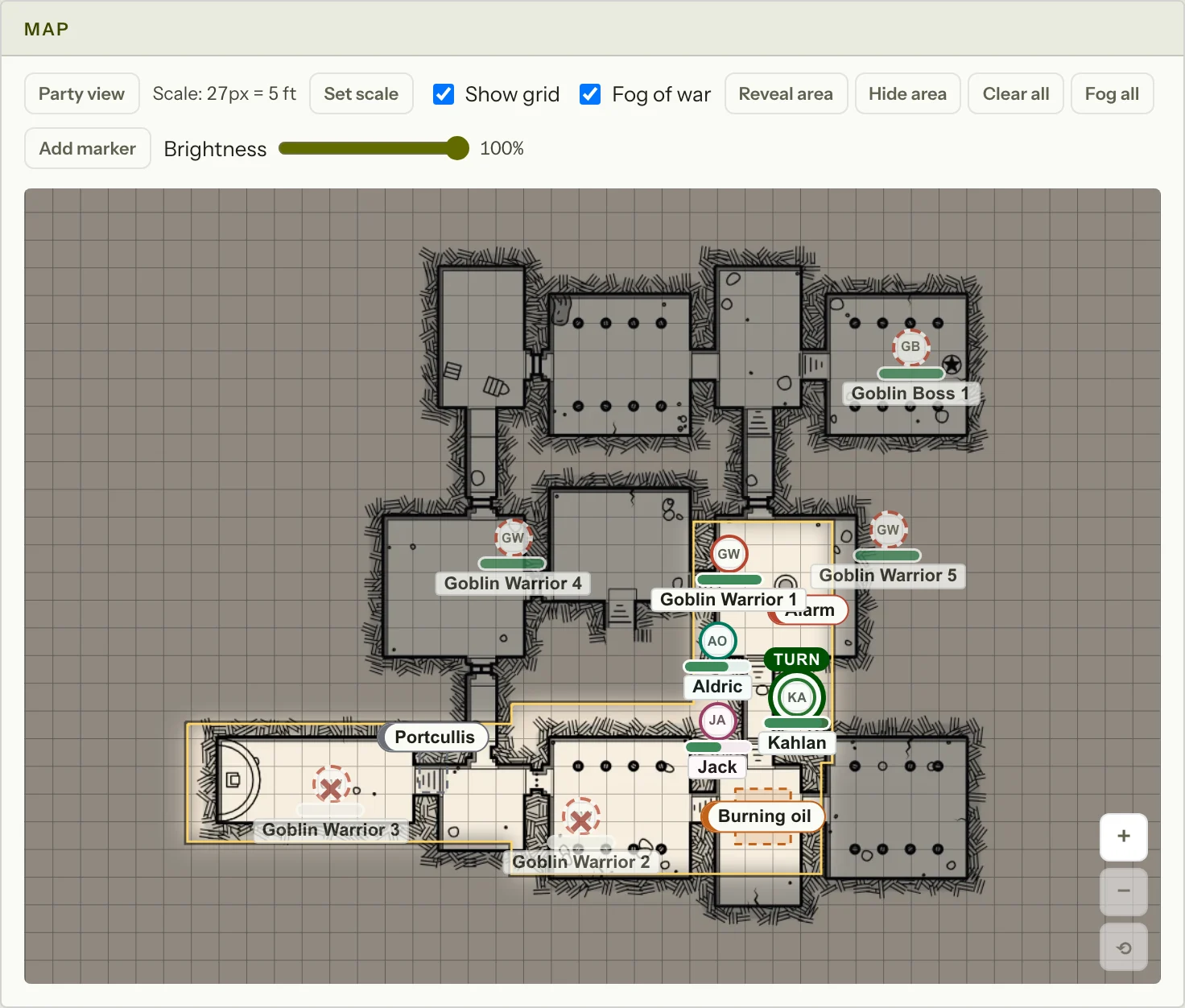
- A map belongs to one encounter. Upload the picture, select two points with a known distance between them, then enter that distance to set the scale.
- The optional grid uses the same scale. Changing the scale during an encounter asks for confirmation.
- Fog begins with the whole map covered. Reveal area and Hide area drag rectangles. Turning fog off forgets the revealed areas and asks first.
- Hidden creatures have no player token. Seen creatures have an unnamed token; named creatures use their name. The Details choices do not reveal a hidden token.
- Circle and square markers take one point. Lines and cones take a start and end; the distance sets their length. Draw creates a freehand marker.
- A marker becomes visible when the fog over its centre is open. The whole marker is then shown.
- In a fight, movement compares the path with the combatant's speed. In a scene it reports distance only. Players can move their own token on their turn, or at any time in a scene.
- Replace map and Remove map ask first. A new picture clears the scale, grid, markers and movement trails, and a fogged map is fogged again from scratch. Tokens stay where they were. Removing the map also removes the tokens.
- Party view shows the exact fog, brightness, markers and tokens currently sent to players.